Monday, November 10, 2014

MultiMarkdown on Ubuntu


Markdown has been around for years, 10 years to be exact. And I haven't really given it much thought until I started using my iPad as a lighter alternative to carrying around a laptop. I know I wouldn't be able to compile and stuff, and I do miss my computer habits from time to time.
So now I've started using Markdown, or MultiMarkdown to be precise since it does feature enhancements vanilla Markdown lacks. One of them is support for Tables. I know, a lot of my colleagues shy away from tables, but I do work in a technical field surrounded by smart engineers who works a lot with tabular data.

On my iPad I have Editorial and have been using it for a few days now that it's deeply ingrained into my daily workflow. But on my desktop... I use what's available. Depending on my mood, I use Mome, Retext, Uberwriter, or plain ole' Vim. But I do use Uberwriter the most especially when I'm drafting a long communiqué.
And then I started working on technical reports.... most of which requires tabular data. Damn!
So I started hunting down a MultiMarkdown application, and stumbled upon MdCharm. Yes, it does support tables. But there's a catch... there's no PPA, and it's no longer being updated/maintained. So if you have time, maybe you could fork the project and help out the community.

Just look at that! Looks great doesn't it?

And if, after installing, you can't seem to launch MdCharm, try launching it from the command line and check for errors. I got the following:
mdcharm: error while loading shared libraries: libhunspell.so: cannot open shared object file: No such file or directory
It's weird since I already have libhunspell installed, but upon locate I found this: /usr/lib/x86_64-linux-gnu/libhunspell-1.3.so.0

So it's just a matter of symlinking it:
sudo ln -s /usr/lib/x86_64-linux-gnu/libhunspell-1.3.so.0 /usr/lib/x86_64-linux-gnu/libhunspell.so

Friday, November 07, 2014

Diodon's dependency on Zeitgeist

So I disabled Zeitgeist since when it starts to scan, it takes up 1GB of RAM..... 1 fucking Gigabyte! I disabled from running it by issuing the following commands:

sudo sed 's/NoDisplay=true/NoDisplay=false/g' -i /etc/xdg/autostart/zeitgeist-datahub.desktop
sudo chmod -x /usr/lib/x86_64-linux-gnu/zeitgeist-fts
sudo chmod -x /usr/bin/zeitgeist-datahub
sudo chmod -x /usr/bin/zeitgeist-daemon


Then searched running zeitgeist processes (via ps command) and killed them.

So finally I got my 1GB of RAM back... whew! Until Diodon started to freeze. It's running, but it ain't keeping tabs of my clipboard, and it ain't clearing. I killed it, then launched from terminal hoping it spits out some error I could work with.

** (diodon:22122): CRITICAL **: file log.c: line 975: unexpected error: Error calling StartServiceByName for org.gnome.zeitgeist.Engine: GDBus.Error:org.freedesktop.DBus.Error.Spawn.ExecFailed: Failed to execute program org.gnome.zeitgeist.Engine: Success (g-dbus-error-quark, 23)

Yup, it's dependent on Zeitgeist alright. And since there's no Zeitgeist plugin for Diodon, and I can't disable it from the application itself, I resorted to uninstalling Diodon and installing ClipIt. And...... I got my clipboard history back!


Yeah, alright it doesn't have an Ambiance theme making it an odd indicator. But I don't care, my clipboard history matters more than visual aesthetics.

Ubuntu/Unity and Conky does not work together

I'm not particularly happy with how Unity (or maybe Compiz) messes up my conky. It gets this way all the time and I have to restart conky every single time it happens. Apparently, I'm not the only one experiencing this problem and so far no definite solution exists (no, I don't want to give my conky it's own window).


Wednesday, December 19, 2012

Box.net and Ubuntu

I've started fully utilizing my Box account and its spacious 50GB limit - which I got from logging in on the Box app on my Xperia Go. The problem is Box doesn't have a native client for Linux, but we can easily access it using a Secure WebDAV connection.


Wednesday, May 12, 2010

Backup MySQL via Crontab

After spending a half an hour figuring out how to make noupe's No. 2 solution work, I finally got my crontab entry that'll execute on my Ubuntu workstation. It took me a while since I stumbled upon a couple of errors, mostly syntax, and the messages wasn't helpful. But here it is:

00 * * * * /usr/bin/mysqldump -h HOSTNAME -u MYUSERNAME -pMYPASSWORD mydatabase | gzip > /home/dax/Backups/db_`/bin/date +\%Y\%m\%d\%H\%M`.sql.gz

What it  does is execute the mysqldump command every hour, pipe it through gzip, and save the compressed file on my Backups directory as db_201005122300.sql.gz (since it executed on May 12, 2010 at 11:00PM)

Notes:

  • The HOSTNAME, MYUSERNAME, and MYPASSWORD should be filled up by you
  • ! % \ etc. should be escaped as such: \! \% \\
  • /bin/date + is very important, it won't execute if you only place date there

Tuesday, December 15, 2009

Blog Clients on Ubuntu

I'm not much of a blogger, but I blog enough to need a client (or clients) to handle my posts. This list ain't much, nor that comprehensive, but here's five clients I use on my Ubuntu box.

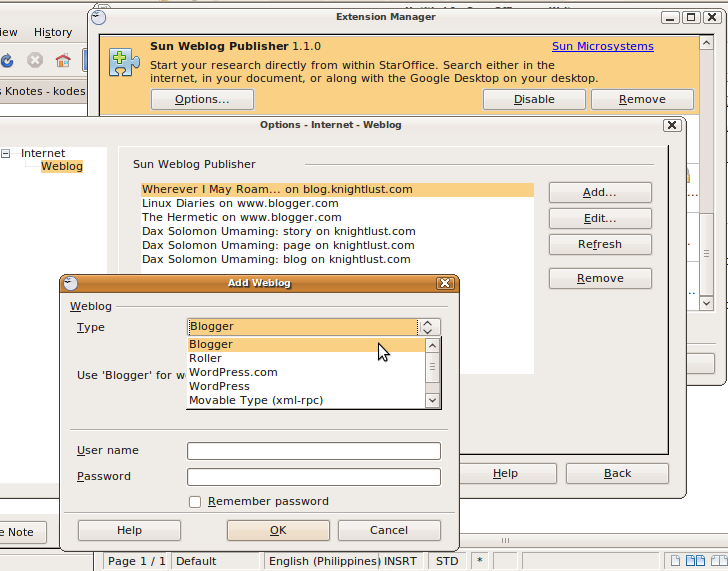
OpenOffice.org with Sun Weblog Extension

This is my favorite, and the one I use often. I always have an OpenOffice.org instance running (either at work or at home) and figured it'll be great if I can post to my blog directly from OO.o. I stumbled upon it last year when I got tired of copy-pasting my articles. This one's great for text-only posting (such as poem/haiku blogs) since I still haven't figured out how to include images even from existing URLs - I'm not even sure this extension even supports it.


Scribefire

This client is also another favorite. In fact, this article was posted from Scribefire. I love the option/feature to upload images directly from my computer, this client will take care of the rest. This one's great if you tend to upload/insert images to your posts.


Drivel

If you prefer a simple, small and fast client, then Drivel's for you. I use it once in a while if I wanted to post something before I lose my train of thoughts.


BloGTK

Although I don't use this client, a few friends swear by it. Configuration's a pain in the ass, and if I can't configure it in 2 mins, then it's not a client for me. I got it working alright, but only on one account.


Flock Browser

This browser is so good that it's literally unproductive. I never got real work done whenever I use it. I tend to check photos, videos, and friends statuses that I never really have time for anything else. The blog client of Flock is great since it integrates nicely into your browser. Image uploads to any one of your image hosting sites, and adding an image is a matter of dragging the thumbnail from the media bar.


Friday, August 07, 2009

PHPMyAdmin doesn't load

Apparently, when changing Apache2 user and/or group, PHPMyAdmin would stop working. I believe this is a security feature. As a workaround, I have to issue the following command.

sudo chmod 644 /etc/phpmyadmin/config-db.php

And I have to again, re-issue the same command every single time I upgrade PHPMyAdmin.


Powered by ScribeFire.

Saturday, July 25, 2009

No Templates Installed on Nautilus

I've been working on tons of PHP, Java, and Python files for quite some time now, and I've recently tried getting the templates feature working on Nautilus. For some reason, the templates directory directs me to my home directory, instead of the usual Templates where I've saved a couple. After googling for answers, I stumbled upon Launchpad Answers which directs me to a forum thread.

Edit ~/.config/user-dirs.dirs and change the template directory from

XDG_TEMPLATES_DIR="$HOME"
to
XDG_TEMPLATES_DIR="$HOME/Templates"


Powered by ScribeFire.

Saturday, June 27, 2009

SmartBro ZTE MF627 on Ubuntu Jaunty

I recently got a SmartBro ZTE MF627. It's a mobile broadband device that utilizes existing 3G, HSDPA, EDGE and GPRS connection (whichever is available). With this device, I can easily connect anywhere there's a cellular signal. This is a better solution over 3G phones which drains your batteries (3hrs battery life with GPRS/3G turned on in my case).


I'm not on the road that often, but I'll be needing it when I'm either at school (where they require you to surf only using their Windows workstations which are full of malwares and keyloggers) or at work and away from my workstation (they've been scrimping on wifi, dedicated ethernet connection only to company workstation, and blocked internet connection via MAC filtering).

The device retails for PhP1,995 (but I got mine way cheaper than their SRP) and usage costs only PhP10 per 30 minutes. It's the cheapest mobile broadband service we have in the Philippines. Granted they still charge you PhP10 even if you've consumed 5mins, but it's still PhP10. I should also note that it's a prepaid service and you can reload from any reloading centers literally scattered all over our country.


Setup would require more work on your Jaunty installation though since it's not yet natively supported - but hopefully will be on Karmic Koala.

Adding the Repository
Go to Liam Green-Hughes' PPA and his PPA to your /etc/apt/sources.list. There's a detailed instructions on how to it on here.

Install the packages
After updating, you'll need to install 2 packages from the repository.

sudo aptitude install zte-mf627-switch usb-modeswitch


Plug your ZTE MF627


Check to see if it's mounted


The Wizard would launch and prompt you to set it up


After that, it should connect your laptop or netbook and you're all set.

Note: This device has a micro-SD port, so you'll have an expandable thumb drive as well as a mobile broadband connection. It's internal disk space though contains Windows executable file. It installs ok on Wine but doesn't work at all with your device.


Note: Mine didn't connect as expected. According to the website, I'll have to first register it on a Windows platform before it works (granted it's addressed to Mac users, it's the same thing for us free OS users).


Update 29 June 2009: It works ok now on Smart Bro now. But we need to configure a few things.

APN: SMARTBRO


Authentication Method: PAP (just PAP)


And also, plugging it in or rebooting doesn't work in my case. Oh it'll connect just fine - but it'll disconnect the moment it authenticates to the server.


My workaround is to completely shut down my netbook. Turn it back on with the wifi turned off from the hardware, and it'll connect just fine.

I took a screenshot after 20mins it's connected.


Saturday, June 13, 2009

MSI Wind Wireless Networking with RTL8187SE

I've been asked tons of times on how to get RTL8187SE working on Ubuntu Jaunty, as posted on http://ubuntuforums.org/showthread.php?p=6794539, we only need to run 2 commands;

sudo aptitude install rtl8187se-source
sudo m-a auto-install rtl8187se


After reboot, your wireless would be up and running. I've also speculated before that we would need to re-issue the 2nd command every after kernel upgrade. This is untrue since I've been through dozens of upgrades and I didn't find any need to re-issue the said command.

Happy surfing!

Monday, December 08, 2008

Dancer IRCD Configuration Files

I've been checking out wiki that I've created in Ubuntu and it's link back, and it seems that a lot of people are still having problems in setting up Dancer-Services, or at least make it work with Dancer IRCD. So to make things simpler, I've attached the two configuration files I've used for the IRCD tutorial. I've tested it on a Hardy server and on my Intrepid box, both worked without any problems. Just take note that if you're going to overwrite the two files, make sure to set ircd.conf as readable by all and services.conf as owned by services.

Dancer Files
ircd.conf
services.conf

Friday, November 07, 2008

DBDesigner4 and MySQL5 on Ubuntu

This is a remake of my other article, but this focuses on efficiency rather than hand-holding. I've tested it on both Ubuntu (and also Xubuntu) Hardy Heron and Intrepid Ibex. I'm a little tired of waiting for MySQL Workbench, so I decided to give DBDesigner another shot.

What we'll use
I'll be using the RPM package since it'll make DBDesigner4 available to all users

What to Install
Install alien via aptitude (or apt-get, whichever you prefer)
sudo aptitude install alien

What to Download
DBDesigner4-0.5.4-0.i586.rpm
http://fabforce.net/downloadfile.php?iddownloadfile=9

kylixlibs3-borqt-3.0-2.tar.gz
http://prdownloads.sourceforge.net/kylixlibs/kylixlibs3-borqt-3.0-2.tar.gz?download

dbxmda.tar.gz
http://crlab.com/dbx/download.html

MySQL-shared-compat-4.1.9-0.i386.rpm
ftp://ftp.wesmo.com/pub/contributed/RPMS/MySQL-shared-compat-4.1.9-0.i386.rpm

How to Install
For convenience sake, save or move the four files to a temporary directory (e.g. ~/temp) then issue to following commands:

For DBDesigner4
  • sudo alien -i DBDesigner4-0.5.4-0.i586.rpm
For kylixlibs3-borqt-3.0-2.tar.gz
  • tar xzvf kylixlibs3-borqt-3.0-2.tar.gz
  • sudo cp kylixlibs3-borqt/libborqt-6.9.0-qt2.3.so /usr/lib/libborqt-6.9-qt2.3.so

For dbxmda.tar.gz
  • tar zxvf dbxmda.tar.gz
  • sudo cp DbxMda/libsqlmda.so.4.20 /usr/lib

For MySQL-shared-compat-4.1.9-0.i386.rpm
  • sudo alien -i MySQL-shared-compat-4.1.9-0.i386.rpm
*Note: no need to run sudo ldconfig after copying the libs since the last command will run it anyway.

What we Installed
DBDesigner4-0.5.4-0.i586.rpm: the DBDesigner4 application

kylixlibs3-borqt-3.0-2.tar.gz: the libborqt object file, this will prevent "libborqt-6.9-qt2.3.so: cannot open shared object file: No such file or directory" errors

dbdesigner03.png

dbxmda.tar.gz: the libsqlmy object file, this will prevent "Unable to Load libsqlmy.so" errors


MySQL-shared-compat-4.1.9-0.i386.rpm: some may encounter the "unable to load libmysqlclient.so" error. There's an incompatibility issue with libmysqlclient.so.15, so you'll need to download and install libmysqlclient.so.10.

What we need to Configure
Fonts
Access the fonts settings from Options > DBDesigner Options > Visual Options and set it to Helvetica sized 10

Menu
Here's the menu settings
Name: DBDesigner4
Icon: /opt/DBDesigner4/Gfx/Icon48.xpm
Command: /opt/DBDesigner4/DBDesigner4

Configuration File
Open ~/.DBDesigner4/DBConn_DefaultSettings.ini in a text editor and change the folowing:

GetDriverFunc=getSQLDriverMYSQL
LibraryNameLinux=libsqlmy.so
VendorLibLinux=libmysqlclient.so

to

GetDriverFunc=getSQLDriverMySQL
LibraryNameLinux=libsqlmda.so.4.20
VendorLibLinux=libmysqlclient.so.10

MySQL5 Settings
In order for DBDesigner4 to access your MySQL5 tables, you need to create another user and set its password to an old format DBDesigner4 understands. Login as root (or as a user that can grant privileges) then execute the commands listed below. Change the username, password, and dbname where appropriate:
  • GRANT ALL PRIVILEGES ON dbname.* TO username@'%'
  • SET PASSWORD FOR username@'%' = OLD_PASSWORD('password')
  • FLUSH PRIVILEGES
How to Reverse Engineer your Database
I believe this article is best suited for this section since it includes screenshots as well as walkthroughs.

Sources:
http://ubuntuforums.org/showthread.php?t=125911
http://www.visualcplusdotnet.com/dbdesignerdatabasetool.html

Sunday, September 21, 2008

Outdated mscomm32.ocx Error on Wine

I've been using MyPhoneExplorer to manage SMS, Contacts, and Calendar on my phone. Recently, I did a fresh install of Xubuntu Intrepid and discovered that MPE doesn't work. It gave me an error:

Run-time error '372':
Failed to load control 'MSComm' from MSCOMM32.OCX. Your version of MSCOMM32.OCX may be outdated. Make sure you are using the version of the control that was provided with your application.


This problem will occur only in Windows 95, 98, NT and 2000. You won't see it in Windows 98SE (Second Edition), Me, XP or Vista. The problem occurs because of a poor design decision that Microsoft made several years ago when they changed from the 16-bit to then-new 32-bit operating system. They've corrected the problem in the newest versions of Windows, but if you are running one of these older operating systems, you may possibly see the error. - AICS Research, Inc.

To fix this, you have to download a newer version of MSComm32.ocx and replace the one that you have installed on ~/.wine/drive_c/windows/system32

Rename the old MSCOMM32.OCX to MSCOMM32.OCX.bak just in case you need it in the future.

Download the files at:
http://www.dataq.com/support/downloads/mscomm32dotocx.zip

or at:
http://www.orbitfiles.com/download/id3289503534.html

Make sure the filename's all Uppercase (MSCOMM32.OCX) - you are, afterall, using Wine on Linux.

So there it is, I got my MPE and I hope you get to run your apps as well.

Wednesday, May 07, 2008

flv to 3gp

Here's how to convert your flv files to 3gp so you can play them on your symbian phones.

ffmpeg -i file.flv -s 176x144 -vcodec h263 -r 28 -b 96k -ab 64 -acodec aac -ac 1 -ar 44100 file.3gp

And here's a batch converter bash script based on mypapit's FLV to 3gp batch converter script, I only changed the ffmpeg part since the output on the script's a wee bit choppy on video and very much crappy on audio playback.

#!/bin/bash
echo "fakap mp3-to-flv converter http://blog.fakap.net/mp3toflv/"
echo "Copyright (c) mypapit 2007"
echo ""
if (($# ==0))
then
    echo "Usage: flvto3gp [flv files] ..."
    exit
fi

while (($# !=0 ))
do
        ffmpeg -i $1 -s 176x144 -vcodec h263 -r 28 -b 96k -ab 64 -acodec aac -ac 1 -ar 44100 $1.3gp
    shift
done
echo "Finished fakaping with flv-to-3gp converter"
echo "\"fakap all those nonsense!\""
echo ""

Make sure that you have ffmpeg and restricted codecs installed.

Blogged with the Flock Browser

Sunday, January 20, 2008

Installing DBDesigner4 on Kubuntu Gutsy

DBDesigner4 is a visual database design system that integrates database design, modeling, creating, and maintenance into a single seamless environment.

DBDesigner4 is, in fact, comparable to products such as Oracle's Designer, IBM's Rational Rose, Computer Associate's ERwin, and theKompany's DataArchitect.
- http://www.fabforce.net/dbdesigner4/

DBDesigner4 an Open Source Software optimized for MySQL databases and is the next best thing to MySQL Workbench - which is based on DBDesigner4. Until MySQL release a Workbench for Linux, I guess we all have to settle for DBDesigner.

What to Download
The first thing you should decide on is what installer to download from http://fabforce.net/downloads.php. There's a Tarball, an RPM, and an EXE file for Windows.

The EXE installs and works great on WINE (if you have it installed). I haven't encountered any problem with this install - yet, not even performance issues. You should use this if you don't want to go through the hassle of troubleshooting DBDesigner. Just click on the installer to launch it on WINE. No need to launch it from the command-line.

But being a Linux aficionado, I preferred a tarball or rpm install though. The tarball's fine, just issue tar zxvf DBDesigner4.0.5.4.tar.gz to extract the files.

The RPM install is preferred if you want DBDesigner4 available to all users on your system. However, you'll need alien on Gutsy. This tutorial would go through installing DBDesigner4-0.5.4-0.i586.rpm.

Installing Alien
Issue the command: sudo aptitude install alien

dbdesigner01.png

Download DBDesigner4-0.5.4-0.i586.rpm
Download the RPM file here: http://fabforce.net/downloadfile.php?iddownloadfile=9

Install DBDesigner4-0.5.4-0.i586.rpm
Issue the command: sudo alien -i DBDesigner4-0.5.4-0.i586.rpm

dbdesigner02.png

libborqt-6.9-qt2.3.so: cannot open shared object file: No such file or directory
DBDesigner4 is installed on /opt/DBDesigner4, however, we wouldn't be able to launch it since it'll give you the libborqt error.

dbdesigner03.png

To fix this error, we need to download and copy libborqt-6.9-qt2.3.so to /usr/lib. Download the file at http://prdownloads.sourceforge.net/kylixlibs/kylixlibs3-borqt-3.0-2.tar.gz?download

Extract it by issuing this command: tar xzvf kylixlibs3-borqt-3.0-2.tar.gz

dbdesigner04.png

Then copy the dependency to /usr/lib: sudo cp kylixlibs3-borqt/libborqt-6.9.0-qt2.3.so /usr/lib/libborqt-6.9-qt2.3.so

dbdesigner05.png

Now launch DBDesigner:


Fonts
The font is sucky, so you may need to change it to Helvetica-10 to make DBDesigner4 look more appealing.
Options > DBDesigner Options > Visual Options

dbdesigner07.png

Menu Entry
Create a Menu Entry using this values:
Name: DBDesigner4
Icon: /opt/DBDesigner4/Gfx/Icon48.xpm
Command: /opt/DBDesigner4/DBDesigner4

dbdesigner08.png

Unable to Load libsqlmy.so
When connecting to the database, you'll get this error:

dbdesigner09.png

To fix this, you need to go to http://crlab.com/dbx/download.html and download dbExpress driver for MySQL, Linux version 4.20

Then to extract the file, type: tar zxvf dbxmda.tar.gz


Then copy libsqlmda.so.4.20 to /usr/lib: sudo cp DbxMda/libsqlmda.so.4.20 /usr/lib
and run: sudo ldconfig


Then relaunch DBDesigner4.

Libmysqlclient.so Error
Some may encounter the unable to load libmysqlclient.so error. There's an incompatibility issue with libmysqlclient.so.15, so you'll need to download and install libmysqlclient.so.10.

Download the file at ftp://ftp.wesmo.com/pub/contributed/RPMS/MySQL-shared-compat-4.1.9-0.i386.rpm

Then install it: sudo alien -i MySQL-shared-compat-4.1.9-0.i386.rpm


Making changes globally
Open ~/.DBDesigner4/DBConn_DefaultSettings.ini in Kate and change the folowing:

GetDriverFunc=getSQLDriverMYSQL
LibraryNameLinux=libsqlmy.so

VendorLibLinux=libmysqlclient.so


to

GetDriverFunc=getSQLDriverMySQL
LibraryNameLinux=libsqlmda.so.4.20
VendorLibLinux=libmysqlclient.so.10


And there you go. Hope everything works for you. I know this is temporary, since we're only waiting for MySQL Workbench for Linux... right?

Blogged with Flock

Sunday, December 16, 2007

Bluetooth Blues in Kubuntu Gutsy

Got a replacement Bluetooth dongle from MSI only to find out that I can't send files from my Nokia phone to my Kubuntu Gutsy. Turns out that this bug has already been reported at https://bugs.edge.launchpad.net/ubuntu/+source/kdebluetooth/+bug/146145. So for those looking for a quick bluetooth fix, here's a little howto:

1) download kdebluetooth_1.0-beta8-0quickpackage_i386.deb from http://peppesbodega.nu/files/Packages

wget http://peppesbodega.nu/files/Packages/kdebluetooth_1.0-beta8-0quickpackage_i386.deb

2) cd to your download directory

3) Install it

dpkg -i kdebluetooth_1.0-beta8-0quickpackage_i386

Notes:
You have to uninstall kbluetooth and libkbluetooth prior to installing this package. Don't worry, this deb would installed it' patched packages.
If your system also uninstalls bluetooth, just reinstall it.

Blogged with Flock

Thursday, October 25, 2007

Connecting to a MySQL Server remotely

I've been working on a PHP code that uses MySQL DBs, and I've been doing it manually from Quanta and PHPMyAdmin. And everyone knows that coding in a browser is a very bad habit. I sure wish I have an IDE with MySQL Admin integrated in it. But before I go searching for that particular IDE, I wanted to make sure that I can access it from both my desktop and my laptop.

I'll be using MySQL Administrator for this tutorial and my MySQL server is hosted on Ubuntu Server Gutsy, subtle differences are expected (if any).

First, the error that'll show up would be this:


To determine if there's a firewall preventing access, try to ping it:


If you can't ping it, open port 3306

sudo iptables -A INPUT -i eth0 -p tcp -m tcp --dport 3306 -j ACCEPT

As I've said earlier, I have PHPMyAdmin installed, I used it to create 4 users for my laptop and my desktop. I made sure I have both the IP Address and Hostname in it. And since I wanted this to be an admin account, I granted it all privileges. Consult the help docs if you don't have PHPMyAdmin installed or if you want to do this manually.


Next up would be to edit /etc/mysql/my.cnf
Comment out bind = 127.0.0.1


Restart MySQL


And lastly, test it out:


I can now create, edit, and drop DBs/Tables from MySQL Administrator. I don't have any need for PHPMyAdmin now that I can access MySQL remotely so I removed it. I'll be searching for a PHP/MySQL IDE next.

Blogged with Flock